<?xml version="1.0" encoding="utf-8"?><feed xmlns="http://www.w3.org/2005/Atom" xml:lang="en"><generator uri="https://jekyllrb.com/" version="3.10.0">Jekyll</generator><link href="https://himitsushell.github.io/feed.xml" rel="self" type="application/atom+xml" /><link href="https://himitsushell.github.io/" rel="alternate" type="text/html" hreflang="en" /><updated>2026-08-13T14:29:01+09:00</updated><id>https://himitsushell.github.io/feed.xml</id><title type="html">HimitsuShell Blog</title><subtitle>shell script protector (llvm obfuscation, embedded interpreter, anti-tamper, DRM). technical articles, security analysis, shc alternative</subtitle><author><name>HimitsuShell</name></author><entry xml:lang="en"><title type="html">How to Protect Source Code in Docker Images and Containers (Python, C/C++, Shell Scripts, LLVM Obfuscation, DRM)</title><link href="https://himitsushell.github.io/en/how-to-protect-docker/" rel="alternate" type="text/html" title="How to Protect Source Code in Docker Images and Containers (Python, C/C++, Shell Scripts, LLVM Obfuscation, DRM)" /><published>2026-08-11T00:00:00+09:00</published><updated>2026-08-11T00:00:00+09:00</updated><id>https://himitsushell.github.io/en/how-to-protect-docker</id><content type="html" xml:base="https://himitsushell.github.io/en/how-to-protect-docker/"><![CDATA[<p>By default, anyone can view and use the source code and executables inside a Docker image.<br />
There are a few ways to keep others from viewing the source code inside a Docker image and to restrict its use to authorized users only.</p>

<h2 id="1-multi-stage-builds">1. Multi-Stage Builds</h2>
<p>This is a built-in image-building feature provided by Docker.<br />
You can select specific files from a previous stage and copy only those into the current stage.<br />
Files you don’t specify aren’t included in the final image, which reduces image size and keeps unnecessary files from being exposed to others.</p>

<div class="language-shell highlighter-rouge"><div class="highlight"><pre class="highlight"><code>FROM ubuntu:24.04 AS builder
WORKDIR /var/work
RUN <span class="nb">touch </span>secret.txt public.txt

FROM ubuntu:24.04
WORKDIR /var/work
<span class="c"># Copy only public.txt</span>
COPY <span class="nt">--from</span><span class="o">=</span>builder /var/work/public.txt <span class="nb">.</span>
</code></pre></div></div>

<h2 id="2-obfuscation-and-drm-by-file-type">2. Obfuscation and DRM by File Type</h2>
<p>As shown above, multi-stage builds let you hide a large portion of the files that would otherwise be exposed inside a Docker image.<br />
However, because of how multi-stage builds work, any files included in the final stage remain intact.<br />
For the final stage, you need to apply separate obfuscation and DRM techniques suited to each type of file (shell scripts, C/C++ programs, etc.).</p>

<h3 id="21-shell-script-obfuscation-and-drm">2.1 Shell Script Obfuscation and DRM</h3>
<p>The most widely known tool for protecting shell scripts is shc.<br />
However, as analyzed in <a href="https://himitsushell.github.io/en/shc-security-analysis/">a previous post</a>, shc has a critical vulnerability.<br />
Let’s use HimitsuShell, which fixes shc’s vulnerability.</p>

<div class="language-shell highlighter-rouge"><div class="highlight"><pre class="highlight"><code><span class="c"># 1. download and load docker image</span>
curl <span class="nt">-LO</span> https://github.com/HimitsuShell/Himitsu/releases/download/v1.2.0/himitsu_core_v1.2.0.tar.gz
docker load <span class="nt">-i</span> himitsu_core_v1.2.0.tar.gz

<span class="c"># 2. start container</span>
docker run <span class="nt">--name</span> himitsu_core <span class="nt">-d</span> <span class="nt">-it</span> himitsu_core:v1.2.0

<span class="c"># 3. upload your shell script (must be named launcher.sh)</span>
docker <span class="nb">cp </span>launcher.sh himitsu_core:/var/work/

<span class="c"># 4. build and download binary (10–20 seconds)</span>
docker <span class="nb">exec </span>himitsu_core /var/work/compile.sh
docker <span class="nb">cp </span>himitsu_core:/var/work/safeLauncher <span class="nb">.</span>

<span class="c"># 5. Run the obfuscated binary</span>
<span class="nb">chmod</span> +x ./safeLauncher
./safeLauncher
</code></pre></div></div>

<h3 id="22-python-obfuscation-and-drm">2.2 Python Obfuscation and DRM</h3>
<p>The most widely known tool for protecting Python code is <a href="https://github.com/dashingsoft/pyarmor">Pyarmor</a>.<br />
Pyarmor provides features such as obfuscation and expiration-date settings.</p>

<div class="language-shell highlighter-rouge"><div class="highlight"><pre class="highlight"><code><span class="c"># Install Pyarmor</span>
pip <span class="nb">install </span>pyarmor

<span class="c"># Obfuscate the Python script</span>
pyarmor gen foo.py

<span class="c"># Run the obfuscated script</span>
python dist/foo.py
</code></pre></div></div>

<h3 id="23-cc-objective-cc-swift-rust-zig-kotlinnative-etc">2.3 C/C++, Objective-C/C++, Swift, Rust, Zig, Kotlin/Native, etc.</h3>
<p>LLVM-based obfuscation tools let you obfuscate a wide range of languages — C/C++, Objective-C, and more — to a level comparable to commercial tools like VMProtect and Enigma Protector.<br />
Let’s try HimitsuObfuscator using C/C++ code as an example.</p>

<table>
  <thead>
    <tr>
      <th>Obfuscation Tool</th>
      <th>LLVM Version</th>
      <th>License</th>
      <th>Commercial Use</th>
      <th>Maintenance</th>
      <th>Notable Points</th>
    </tr>
  </thead>
  <tbody>
    <tr>
      <td>OLLVM</td>
      <td>4</td>
      <td>UIUC/NCSA</td>
      <td>Allowed</td>
      <td>Discontinued in 2017</td>
      <td>The starting point of LLVM-based obfuscation tools</td>
    </tr>
    <tr>
      <td>Hikari Obfuscator</td>
      <td>8</td>
      <td>Modified AGPLv3</td>
      <td>Allowed with restrictions</td>
      <td>Discontinued in 2020</td>
      <td>Applied more advanced obfuscation techniques after OLLVM</td>
    </tr>
    <tr>
      <td>Himitsu Obfuscator</td>
      <td>17</td>
      <td>MIT</td>
      <td>Allowed</td>
      <td>Actively maintained</td>
      <td>Fixed OLLVM bugs, expanded obfuscation coverage</td>
    </tr>
  </tbody>
</table>

<div class="language-shell highlighter-rouge"><div class="highlight"><pre class="highlight"><code><span class="c"># Required: Ubuntu 24.04</span>

<span class="c"># download and extract obfuscator</span>
curl <span class="nt">-LO</span> https://github.com/HimitsuShell/HimitsuObfuscator/releases/download/v1.2.0_0/himitsu_obfuscator_v1.2.0_0.tar
<span class="nb">tar</span> <span class="nt">-xvf</span> himitsu_obfuscator_v1.2.0_0.tar

vim main.c
<span class="nt">-----------------------------</span>
<span class="c">#include &lt;stdio.h&gt;</span>
int main<span class="o">()</span> <span class="o">{</span>
  <span class="nb">printf</span><span class="o">(</span><span class="s2">"Hello World!</span><span class="se">\n</span><span class="s2">"</span><span class="o">)</span><span class="p">;</span>
  <span class="k">return </span>0<span class="p">;</span>
<span class="o">}</span>
<span class="nt">-----------------------------</span>

<span class="c"># builds a binary that runs on any linux (static musl)</span>
<span class="nb">sudo </span>apt-get <span class="nb">install</span> <span class="nt">-y</span> build-essential
./compiler/bin/x86_64-unknown-linux-musl-clang <span class="nt">-flto</span> <span class="nt">-fuse-ld</span><span class="o">=</span>lld <span class="nt">-mllvm</span> <span class="nt">-sobf</span> <span class="nt">-mllvm</span> <span class="nt">-sub</span> <span class="nt">-static</span> main.c <span class="nt">-o</span> main
./main
</code></pre></div></div>

<h2 id="conclusion">Conclusion</h2>
<p>Applying the methods above in layers can block most source code theft attempts by beginners, like script kiddies.<br />
For a skilled reverse engineer, though, these methods only slow down and complicate the attack — they don’t make it impossible.<br />
So on top of the methods above, you’ll need to keep applying various stronger techniques as well.</p>

<p>I’ll cover additional methods in the next post.</p>]]></content><author><name>HimitsuShell</name></author><category term="en" /><summary type="html"><![CDATA[By default, anyone can view and use the source code and executables inside a Docker image. There are a few ways to keep others from viewing the source code inside a Docker image and to restrict its use to authorized users only.]]></summary></entry><entry xml:lang="ja"><title type="html">Docker イメージ・コンテナのソースコード保護方法(Python、C/C++、シェルスクリプト、LLVM難読化、DRM)</title><link href="https://himitsushell.github.io/ja/how-to-protect-docker/" rel="alternate" type="text/html" title="Docker イメージ・コンテナのソースコード保護方法(Python、C/C++、シェルスクリプト、LLVM難読化、DRM)" /><published>2026-08-11T00:00:00+09:00</published><updated>2026-08-11T00:00:00+09:00</updated><id>https://himitsushell.github.io/ja/how-to-protect-docker</id><content type="html" xml:base="https://himitsushell.github.io/ja/how-to-protect-docker/"><![CDATA[<p>Dockerイメージの中にあるソースコードや実行ファイルは、基本的に誰でも見て使うことができます。<br />
他人がDockerイメージ内のソースコードを見られないようにし、許可されたユーザーだけが使用できるようにするいくつかの方法があります。</p>

<h2 id="1-マルチステージビルド">1. マルチステージビルド</h2>
<p>Dockerが標準で提供しているイメージビルド機能です。<br />
前のステージから特定のファイルだけを選んで、現在のステージにコピーすることができます。<br />
指定していないファイルは最終イメージに含まれないため、イメージサイズを削減できるだけでなく、不要なファイルが他人に露出するのを防ぐこともできます。</p>

<div class="language-shell highlighter-rouge"><div class="highlight"><pre class="highlight"><code>FROM ubuntu:24.04 AS builder
WORKDIR /var/work
RUN <span class="nb">touch </span>secret.txt public.txt

FROM ubuntu:24.04
WORKDIR /var/work
<span class="c"># Copy only public.txt</span>
COPY <span class="nt">--from</span><span class="o">=</span>builder /var/work/public.txt <span class="nb">.</span>
</code></pre></div></div>

<h2 id="2-ファイル形式ごとの難読化drm適用">2. ファイル形式ごとの難読化・DRM適用</h2>
<p>上記のようにマルチステージビルドを使えば、Dockerイメージ内で露出するファイルの多くを隠すことができます。<br />
しかし、マルチステージビルドの構造上、最終ステージに含まれるファイルはそのまま残ってしまいます。<br />
最終ステージでは、各ファイル(シェルスクリプト、C/C++プログラムなど)の形式に合わせて、個別の難読化やDRM技術を適用する必要があります。</p>

<h3 id="21-シェルスクリプトの難読化drm適用">2.1 シェルスクリプトの難読化・DRM適用</h3>
<p>シェルスクリプト保護ツールの中で最も広く知られているのはshcです。<br />
しかしshcには、<a href="https://himitsushell.github.io/ja/shc-security-analysis/">前回の記事</a>で分析したように致命的な脆弱性が存在します。<br />
shcの脆弱性を補ったHimitsuShellを使ってみましょう。</p>

<div class="language-shell highlighter-rouge"><div class="highlight"><pre class="highlight"><code><span class="c"># 1. download and load docker image</span>
curl <span class="nt">-LO</span> https://github.com/HimitsuShell/Himitsu/releases/download/v1.2.0/himitsu_core_v1.2.0.tar.gz
docker load <span class="nt">-i</span> himitsu_core_v1.2.0.tar.gz

<span class="c"># 2. start container</span>
docker run <span class="nt">--name</span> himitsu_core <span class="nt">-d</span> <span class="nt">-it</span> himitsu_core:v1.2.0

<span class="c"># 3. upload your shell script (must be named launcher.sh)</span>
docker <span class="nb">cp </span>launcher.sh himitsu_core:/var/work/

<span class="c"># 4. build and download binary (10–20 seconds)</span>
docker <span class="nb">exec </span>himitsu_core /var/work/compile.sh
docker <span class="nb">cp </span>himitsu_core:/var/work/safeLauncher <span class="nb">.</span>

<span class="c"># 5. Run the obfuscated binary</span>
<span class="nb">chmod</span> +x ./safeLauncher
./safeLauncher
</code></pre></div></div>

<h3 id="22-pythonの難読化drm適用">2.2 Pythonの難読化・DRM適用</h3>
<p>Python保護ツールの中で最も広く知られているのは<a href="https://github.com/dashingsoft/pyarmor">Pyarmor</a>です。<br />
Pyarmorは難読化や有効期限の設定などの機能を提供します。</p>

<div class="language-shell highlighter-rouge"><div class="highlight"><pre class="highlight"><code><span class="c"># Install Pyarmor</span>
pip <span class="nb">install </span>pyarmor

<span class="c"># Obfuscate the Python script</span>
pyarmor gen foo.py

<span class="c"># Run the obfuscated script</span>
python dist/foo.py
</code></pre></div></div>

<h3 id="23-ccobjective-ccswiftrustzigkotlinnativeなど">2.3 C/C++、Objective-C/C++、Swift、Rust、Zig、Kotlin/Nativeなど</h3>
<p>LLVMベースの難読化ツールを使えば、C/C++やObjective-Cなど多様な言語を、商用ツール(VMProtect、Enigma Protectorなど)と同等のレベルまで難読化することができます。<br />
C/C++コードを例に、HimitsuObfuscatorを使ってみましょう。</p>

<table>
  <thead>
    <tr>
      <th>難読化ツール</th>
      <th>LLVMバージョン</th>
      <th>ライセンス</th>
      <th>商用利用</th>
      <th>メンテナンス</th>
      <th>特徴</th>
    </tr>
  </thead>
  <tbody>
    <tr>
      <td>OLLVM</td>
      <td>4</td>
      <td>UIUC/NCSA</td>
      <td>許可</td>
      <td>2017年に開発停止</td>
      <td>LLVM難読化ツールの出発点</td>
    </tr>
    <tr>
      <td>Hikari Obfuscator</td>
      <td>8</td>
      <td>改変されたAGPLv3</td>
      <td>制限付きで許可</td>
      <td>2020年に開発停止</td>
      <td>OLLVM以降の先進的な難読化技術を適用</td>
    </tr>
    <tr>
      <td>Himitsu Obfuscator</td>
      <td>17</td>
      <td>MIT</td>
      <td>許可</td>
      <td>継続中</td>
      <td>OLLVMのバグ修正、難読化範囲の拡張</td>
    </tr>
  </tbody>
</table>

<div class="language-shell highlighter-rouge"><div class="highlight"><pre class="highlight"><code><span class="c"># Required: Ubuntu 24.04</span>

<span class="c"># download and extract obfuscator</span>
curl <span class="nt">-LO</span> https://github.com/HimitsuShell/HimitsuObfuscator/releases/download/v1.2.0_0/himitsu_obfuscator_v1.2.0_0.tar
<span class="nb">tar</span> <span class="nt">-xvf</span> himitsu_obfuscator_v1.2.0_0.tar

vim main.c
<span class="nt">-----------------------------</span>
<span class="c">#include &lt;stdio.h&gt;</span>
int main<span class="o">()</span> <span class="o">{</span>
  <span class="nb">printf</span><span class="o">(</span><span class="s2">"Hello World!</span><span class="se">\n</span><span class="s2">"</span><span class="o">)</span><span class="p">;</span>
  <span class="k">return </span>0<span class="p">;</span>
<span class="o">}</span>
<span class="nt">-----------------------------</span>

<span class="c"># builds a binary that runs on any linux (static musl)</span>
<span class="nb">sudo </span>apt-get <span class="nb">install</span> <span class="nt">-y</span> build-essential
./compiler/bin/x86_64-unknown-linux-musl-clang <span class="nt">-flto</span> <span class="nt">-fuse-ld</span><span class="o">=</span>lld <span class="nt">-mllvm</span> <span class="nt">-sobf</span> <span class="nt">-mllvm</span> <span class="nt">-sub</span> <span class="nt">-static</span> main.c <span class="nt">-o</span> main
./main
</code></pre></div></div>

<h2 id="まとめ">まとめ</h2>
<p>上記の方法を多層的に適用すれば、スクリプトキディのような初心者によるソースコードの窃取はほとんど防ぐことができます。<br />
しかし、実力のあるリバースエンジニアに対しては、攻撃を遅らせ、困難にするだけであり、不可能にすることはできません。<br />
したがって、上記の方法に加えて、様々な高強度の技術を継続的に適用していく必要があります。</p>

<p>次回の記事で、さらに他の方法をご紹介します。</p>]]></content><author><name>HimitsuShell</name></author><category term="ja" /><summary type="html"><![CDATA[Dockerイメージの中にあるソースコードや実行ファイルは、基本的に誰でも見て使うことができます。 他人がDockerイメージ内のソースコードを見られないようにし、許可されたユーザーだけが使用できるようにするいくつかの方法があります。]]></summary></entry><entry xml:lang="ko"><title type="html">도커 이미지·컨테이너 소스코드 보호 방법 (Python, C/C++, 쉘 스크립트, LLVM 난독화, DRM)</title><link href="https://himitsushell.github.io/ko/how-to-protect-docker/" rel="alternate" type="text/html" title="도커 이미지·컨테이너 소스코드 보호 방법 (Python, C/C++, 쉘 스크립트, LLVM 난독화, DRM)" /><published>2026-08-11T00:00:00+09:00</published><updated>2026-08-11T00:00:00+09:00</updated><id>https://himitsushell.github.io/ko/how-to-protect-docker</id><content type="html" xml:base="https://himitsushell.github.io/ko/how-to-protect-docker/"><![CDATA[<p>도커 이미지 안에 있는 소스코드와 실행 파일은 기본적으로 누구나 보고 사용할 수 있습니다.<br />
다른 사람이 도커 이미지 안의 소스코드를 볼 수 없게 하고, 허가된 사람만 사용할 수 있도록 하는 몇 가지 방법이 있습니다.</p>

<h2 id="1-멀티-스테이지-빌드">1. 멀티 스테이지 빌드</h2>
<p>도커에서 기본적으로 제공하는 이미지 빌드 기능입니다.<br />
이전 스테이지의 특정 파일만 선택하여, 현재 스테이지로 복사할 수 있습니다.<br />
지정되지 않은 파일은 최종 이미지에 포함되지 않아, 이미지 크기를 줄이고 불필요한 파일이 다른 사람에게 노출되는것을 막을 수 있습니다.</p>

<div class="language-shell highlighter-rouge"><div class="highlight"><pre class="highlight"><code>FROM ubuntu:24.04 AS builder
WORKDIR /var/work
RUN <span class="nb">touch </span>secret.txt public.txt

FROM ubuntu:24.04
WORKDIR /var/work
<span class="c"># Copy only public.txt</span>
COPY <span class="nt">--from</span><span class="o">=</span>builder /var/work/public.txt <span class="nb">.</span>
</code></pre></div></div>

<h2 id="2-파일-형태별-난독화-drm-적용">2. 파일 형태별 난독화, DRM 적용</h2>
<p>위와 같이 멀티 스테이지 빌드를 사용하면, 도커 이미지 안에서 노출되는 상당수의 파일을 숨길 수 있습니다.<br />
하지만 멀티 스테이지 빌드 구조상 최종 스테이지에 포함된 파일은 그대로 남아있습니다.<br />
최종 스테이지에서는 각 파일(쉘 스크립트, C/C++ 프로그램 등)의 형태에 맞는 별도의 난독화 및 DRM 기술을 적용해야 합니다.</p>

<h3 id="21-쉘-스크립트-난독화-drm-적용">2.1 쉘 스크립트 난독화, DRM 적용</h3>
<p>쉘 스크립트 보호 도구 중 가장 널리 알려진 것은 shc입니다.<br />
하지만 shc는 <a href="https://himitsushell.github.io/ko/shc-security-analysis/">이전 글</a>에서 분석한 것처럼 치명적인 취약점이 존재합니다.<br />
shc의 취약점을 보완한 HimitsuShell을 사용해보겠습니다.</p>

<div class="language-shell highlighter-rouge"><div class="highlight"><pre class="highlight"><code><span class="c"># 1. download and load docker image</span>
curl <span class="nt">-LO</span> https://github.com/HimitsuShell/Himitsu/releases/download/v1.2.0/himitsu_core_v1.2.0.tar.gz
docker load <span class="nt">-i</span> himitsu_core_v1.2.0.tar.gz

<span class="c"># 2. start container</span>
docker run <span class="nt">--name</span> himitsu_core <span class="nt">-d</span> <span class="nt">-it</span> himitsu_core:v1.2.0

<span class="c"># 3. upload your shell script (must be named launcher.sh)</span>
docker <span class="nb">cp </span>launcher.sh himitsu_core:/var/work/

<span class="c"># 4. build and download binary (10–20 seconds)</span>
docker <span class="nb">exec </span>himitsu_core /var/work/compile.sh
docker <span class="nb">cp </span>himitsu_core:/var/work/safeLauncher <span class="nb">.</span>

<span class="c"># 5. Run the obfuscated binary</span>
<span class="nb">chmod</span> +x ./safeLauncher
./safeLauncher
</code></pre></div></div>

<h3 id="22-python-난독화-drm-적용">2.2 Python 난독화, DRM 적용</h3>
<p>Python 보호 도구 중 가장 널리 알려진 것은 <a href="https://github.com/dashingsoft/pyarmor">Pyarmor</a>입니다.<br />
Pyarmor는 난독화, 만료일 설정 등의 기능을 제공합니다.</p>

<div class="language-shell highlighter-rouge"><div class="highlight"><pre class="highlight"><code><span class="c"># Install Pyarmor</span>
pip <span class="nb">install </span>pyarmor

<span class="c"># Obfuscate the Python script</span>
pyarmor gen foo.py

<span class="c"># Run the obfuscated script</span>
python dist/foo.py
</code></pre></div></div>

<h3 id="23-cc-objective-cc--swift-rust-zig-kotlinnative-등">2.3 C/C++, Objective-C/C++ , Swift, Rust, Zig, Kotlin/Native 등</h3>
<p>LLVM 기반의 난독화 도구를 사용하면 C/C++, Objective-C 등 다양한 언어를 상용 도구(VMProtect, Enigma Protector 등) 수준으로 난독화할 수 있습니다.<br />
C/C++ 코드를 예시로 HimitsuObfuscator를 사용해보겠습니다.</p>

<table>
  <thead>
    <tr>
      <th>난독화 도구</th>
      <th>LLVM 버전</th>
      <th>라이선스</th>
      <th>상업적 목적</th>
      <th>유지보수</th>
      <th>주목할 점</th>
    </tr>
  </thead>
  <tbody>
    <tr>
      <td>OLLVM</td>
      <td>4</td>
      <td>UIUC/NCSA</td>
      <td>허용</td>
      <td>2017년 중단</td>
      <td>LLVM 난독화 도구의 시작점</td>
    </tr>
    <tr>
      <td>Hikari Obfuscator</td>
      <td>8</td>
      <td>변형된 AGPLv3</td>
      <td>제한적 허용</td>
      <td>2020년 중단</td>
      <td>OLLVM 이후 선진적 난독화 기법 적용</td>
    </tr>
    <tr>
      <td>Himitsu Obfuscator</td>
      <td>17</td>
      <td>MIT</td>
      <td>허용</td>
      <td>유지 중</td>
      <td>OLLVM 버그 개선, 난독화 범위 확장</td>
    </tr>
  </tbody>
</table>

<div class="language-shell highlighter-rouge"><div class="highlight"><pre class="highlight"><code><span class="c"># Required: Ubuntu 24.04</span>

<span class="c"># download and extract obfuscator</span>
curl <span class="nt">-LO</span> https://github.com/HimitsuShell/HimitsuObfuscator/releases/download/v1.2.0_0/himitsu_obfuscator_v1.2.0_0.tar
<span class="nb">tar</span> <span class="nt">-xvf</span> himitsu_obfuscator_v1.2.0_0.tar

vim main.c
<span class="nt">-----------------------------</span>
<span class="c">#include &lt;stdio.h&gt;</span>
int main<span class="o">()</span> <span class="o">{</span>
  <span class="nb">printf</span><span class="o">(</span><span class="s2">"Hello World!</span><span class="se">\n</span><span class="s2">"</span><span class="o">)</span><span class="p">;</span>
  <span class="k">return </span>0<span class="p">;</span>
<span class="o">}</span>
<span class="nt">-----------------------------</span>

<span class="c"># builds a binary that runs on any linux (static musl)</span>
<span class="nb">sudo </span>apt-get <span class="nb">install</span> <span class="nt">-y</span> build-essential
./compiler/bin/x86_64-unknown-linux-musl-clang <span class="nt">-flto</span> <span class="nt">-fuse-ld</span><span class="o">=</span>lld <span class="nt">-mllvm</span> <span class="nt">-sobf</span> <span class="nt">-mllvm</span> <span class="nt">-sub</span> <span class="nt">-static</span> main.c <span class="nt">-o</span> main
./main
</code></pre></div></div>

<h2 id="결론">결론</h2>
<p>위 방법들을 다층적으로 적용하면, 스크립트 키디와 같은 초보자에 의한 소스코드 탈취는 대부분 막아낼 수 있습니다.<br />
하지만 실력 있는 리버스 엔지니어에게는 공격을 지연시키고 까다롭게 만들 뿐, 불가능하게 만들지는 못합니다.<br />
따라서 위 방법에 더해 다양한 고강도 기술을 지속적으로 적용해야만 합니다.</p>

<p>다음 글에서 추가적인 방법을 소개하겠습니다.</p>]]></content><author><name>HimitsuShell</name></author><category term="ko" /><summary type="html"><![CDATA[도커 이미지 안에 있는 소스코드와 실행 파일은 기본적으로 누구나 보고 사용할 수 있습니다. 다른 사람이 도커 이미지 안의 소스코드를 볼 수 없게 하고, 허가된 사람만 사용할 수 있도록 하는 몇 가지 방법이 있습니다.]]></summary></entry><entry xml:lang="zh"><title type="html">Docker 镜像与容器源代码保护方法（Python、C/C++、Shell 脚本、LLVM 混淆、DRM）</title><link href="https://himitsushell.github.io/zh/how-to-protect-docker/" rel="alternate" type="text/html" title="Docker 镜像与容器源代码保护方法（Python、C/C++、Shell 脚本、LLVM 混淆、DRM）" /><published>2026-08-11T00:00:00+09:00</published><updated>2026-08-11T00:00:00+09:00</updated><id>https://himitsushell.github.io/zh/how-to-protect-docker</id><content type="html" xml:base="https://himitsushell.github.io/zh/how-to-protect-docker/"><![CDATA[<p>Docker 镜像中的源代码和可执行文件，默认情况下任何人都可以查看和使用。<br />
不过有几种方法可以防止他人查看 Docker 镜像中的源代码，让只有获得授权的人才能使用。</p>

<h2 id="1-多阶段构建multi-stage-build">1. 多阶段构建（Multi-stage build）</h2>
<p>这是 Docker 默认提供的镜像构建功能。<br />
可以只选取前一构建阶段中的特定文件，复制到当前阶段中。<br />
未被指定的文件不会包含在最终镜像里，这样既能减小镜像体积，又能防止不必要的文件暴露给他人。</p>

<div class="language-shell highlighter-rouge"><div class="highlight"><pre class="highlight"><code>FROM ubuntu:24.04 AS builder
WORKDIR /var/work
RUN <span class="nb">touch </span>secret.txt public.txt

FROM ubuntu:24.04
WORKDIR /var/work
<span class="c"># Copy only public.txt</span>
COPY <span class="nt">--from</span><span class="o">=</span>builder /var/work/public.txt <span class="nb">.</span>
</code></pre></div></div>

<h2 id="2-按文件类型进行混淆应用-drm">2. 按文件类型进行混淆、应用 DRM</h2>
<p>如上所述，使用多阶段构建可以隐藏 Docker 镜像中大部分会暴露出来的文件。<br />
但由于多阶段构建的结构特性，最终层中包含的文件仍会原样保留下来。<br />
因此需要针对最终层中每种文件（Shell 脚本、C/C++ 程序等）各自的形式，分别应用相应的混淆和 DRM 技术。</p>

<h3 id="21-shell-脚本混淆与-drm-应用">2.1 Shell 脚本混淆与 DRM 应用</h3>

<p>在 Shell 脚本保护工具中，最广为人知的是 shc。<br />
但正如<a href="https://himitsushell.github.io/zh/shc-security-analysis/">上一篇文章</a>中分析的那样，shc 存在致命的安全漏洞。<br />
接下来我们使用弥补了 shc 漏洞的 HimitsuShell 来试一下。</p>

<div class="language-shell highlighter-rouge"><div class="highlight"><pre class="highlight"><code><span class="c"># 1. download and load docker image</span>
curl <span class="nt">-LO</span> https://github.com/HimitsuShell/Himitsu/releases/download/v1.2.0/himitsu_core_v1.2.0.tar.gz
docker load <span class="nt">-i</span> himitsu_core_v1.2.0.tar.gz

<span class="c"># 2. start container</span>
docker run <span class="nt">--name</span> himitsu_core <span class="nt">-d</span> <span class="nt">-it</span> himitsu_core:v1.2.0

<span class="c"># 3. upload your shell script (must be named launcher.sh)</span>
docker <span class="nb">cp </span>launcher.sh himitsu_core:/var/work/

<span class="c"># 4. build and download binary (10–20 seconds)</span>
docker <span class="nb">exec </span>himitsu_core /var/work/compile.sh
docker <span class="nb">cp </span>himitsu_core:/var/work/safeLauncher <span class="nb">.</span>

<span class="c"># 5. Run the obfuscated binary</span>
<span class="nb">chmod</span> +x ./safeLauncher
./safeLauncher
</code></pre></div></div>

<h3 id="22-python-混淆与-drm-应用">2.2 Python 混淆与 DRM 应用</h3>

<p>在 Python 保护工具中，最广为人知的是 Pyarmor。<br />
Pyarmor 提供代码混淆、设置过期日期等功能。</p>

<div class="language-shell highlighter-rouge"><div class="highlight"><pre class="highlight"><code><span class="c"># Install Pyarmor</span>
pip <span class="nb">install </span>pyarmor

<span class="c"># Obfuscate the Python script</span>
pyarmor gen foo.py

<span class="c"># Run the obfuscated script</span>
python dist/foo.py
</code></pre></div></div>

<h3 id="23-ccobjective-ccswiftrustzigkotlinnative-等">2.3 C/C++、Objective-C/C++、Swift、Rust、Zig、Kotlin/Native 等</h3>

<p>使用基于 LLVM 的混淆工具，可以让 C/C++、Objective-C 等多种语言的混淆强度达到商业级保护工具（VMProtect、Enigma Protector 等）的水平。<br />
下面以 C/C++ 代码为例，使用 HimitsuObfuscator 来演示一下。</p>

<table>
  <thead>
    <tr>
      <th>混淆工具</th>
      <th>LLVM 版本</th>
      <th>许可证</th>
      <th>商业用途</th>
      <th>维护状态</th>
      <th>值得关注的点</th>
    </tr>
  </thead>
  <tbody>
    <tr>
      <td>OLLVM</td>
      <td>4</td>
      <td>UIUC/NCSA</td>
      <td>允许</td>
      <td>2017 年停止维护</td>
      <td>LLVM 混淆工具的起点</td>
    </tr>
    <tr>
      <td>Hikari Obfuscator</td>
      <td>8</td>
      <td>修改版 AGPLv3</td>
      <td>有限制地允许</td>
      <td>2020 年停止维护</td>
      <td>在 OLLVM 之后采用了更先进的混淆技术</td>
    </tr>
    <tr>
      <td>Himitsu Obfuscator</td>
      <td>17</td>
      <td>MIT</td>
      <td>允许</td>
      <td>持续维护中</td>
      <td>修复了 OLLVM 的缺陷，扩大了混淆范围</td>
    </tr>
  </tbody>
</table>

<div class="language-shell highlighter-rouge"><div class="highlight"><pre class="highlight"><code><span class="c"># Required: Ubuntu 24.04</span>

<span class="c"># download and extract obfuscator</span>
curl <span class="nt">-LO</span> https://github.com/HimitsuShell/HimitsuObfuscator/releases/download/v1.2.0_0/himitsu_obfuscator_v1.2.0_0.tar
<span class="nb">tar</span> <span class="nt">-xvf</span> himitsu_obfuscator_v1.2.0_0.tar

vim main.c
<span class="nt">-----------------------------</span>
<span class="c">#include &lt;stdio.h&gt;</span>
int main<span class="o">()</span> <span class="o">{</span>
  <span class="nb">printf</span><span class="o">(</span><span class="s2">"Hello World!</span><span class="se">\n</span><span class="s2">"</span><span class="o">)</span><span class="p">;</span>
  <span class="k">return </span>0<span class="p">;</span>
<span class="o">}</span>
<span class="nt">-----------------------------</span>

<span class="c"># builds a binary that runs on any linux (static musl)</span>
<span class="nb">sudo </span>apt-get <span class="nb">install</span> <span class="nt">-y</span> build-essential
./compiler/bin/x86_64-unknown-linux-musl-clang <span class="nt">-flto</span> <span class="nt">-fuse-ld</span><span class="o">=</span>lld <span class="nt">-mllvm</span> <span class="nt">-sobf</span> <span class="nt">-mllvm</span> <span class="nt">-sub</span> <span class="nt">-static</span> main.c <span class="nt">-o</span> main
./main
</code></pre></div></div>

<h2 id="总结">总结</h2>
<p>综合运用上述方法，基本可以防范像脚本小子（script kiddie）这类新手对源代码的窃取。<br />
但对于技术娴熟的逆向工程师来说，这些方法只能增加逆向难度、延缓破解进度，并不能使其变得不可能。<br />
因此，除了上述方法之外，还必须持续应用各种更高强度的技术。</p>

<p>我们将在下一篇文章中介绍更多方法。</p>]]></content><author><name>HimitsuShell</name></author><category term="zh" /><summary type="html"><![CDATA[Docker 镜像中的源代码和可执行文件，默认情况下任何人都可以查看和使用。 不过有几种方法可以防止他人查看 Docker 镜像中的源代码，让只有获得授权的人才能使用。]]></summary></entry><entry xml:lang="en"><title type="html">Linux Shell Script Security: Structural Limitations and Vulnerabilities in ssc (Source Code Protection, Obfuscation, Reverse Engineering)</title><link href="https://himitsushell.github.io/en/ssc-security-analysis/" rel="alternate" type="text/html" title="Linux Shell Script Security: Structural Limitations and Vulnerabilities in ssc (Source Code Protection, Obfuscation, Reverse Engineering)" /><published>2026-08-10T00:00:00+09:00</published><updated>2026-08-10T00:00:00+09:00</updated><id>https://himitsushell.github.io/en/ssc-security-analysis</id><content type="html" xml:base="https://himitsushell.github.io/en/ssc-security-analysis/"><![CDATA[<p><a href="https://github.com/liberize/ssc">ssc</a> is a project that improves on shc (shell script compiler).<br />
Like shc, it wraps a shell script in C source code and compiles it into a binary to keep the code from being exposed.</p>

<p>Unlike shc, ssc doesn’t rely on the system shell — it uses a separate shell interpreter (e.g., BusyBox) instead.<br />
So <a href="https://himitsushell.github.io/en/shc-security-analysis/">the technique used to attack shc (auditd)</a> can’t be applied to ssc in the same way.</p>

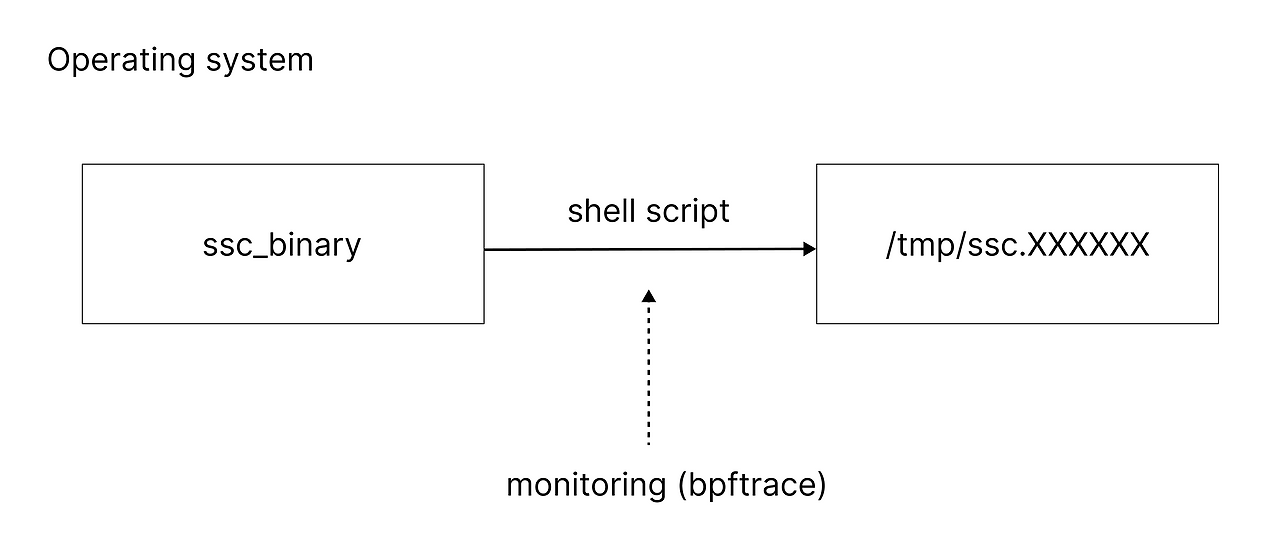
<p>That said, ssc has a structural limitation of its own.<br />
A binary built with ssc briefly drops the embedded shell interpreter (e.g., BusyBox) to disk at /tmp/ssc.XXXXXX/busybox, then hands the shell script off to it to run.<br />
<strong>So if you just watch for the moment the embedded shell interpreter gets exposed externally, you can capture the shell script.</strong></p>

<p><img src="/assets/images/ssc-security-analysis/1.png" alt="ssc vulnerability diagram" /></p>

<p>Let’s test this directly and confirm the vulnerability.</p>

<h2 id="test-environment">Test Environment</h2>
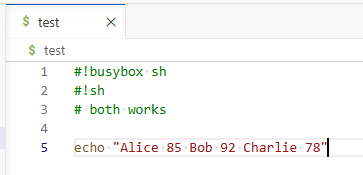
<p>The following shell script was tested on Ubuntu 24.04.</p>

<p><img src="/assets/images/ssc-security-analysis/2.png" alt="Test shell script" /></p>

<p>We’ll build the binary with the <a href="https://github.com/liberize/ssc/tree/master/examples/4_embed_interpreter">shell interpreter (BusyBox) embedded</a>, as shown below.</p>

<div class="language-shell highlighter-rouge"><div class="highlight"><pre class="highlight"><code>./ssc <span class="nb">test </span>ssc_binary <span class="nt">-s</span> <span class="nt">-r</span> <span class="nt">-e</span> busybox <span class="nt">-c</span>
</code></pre></div></div>

<h2 id="test-method">Test Method</h2>
<div class="language-shell highlighter-rouge"><div class="highlight"><pre class="highlight"><code><span class="c"># Install bpftrace</span>
<span class="nb">sudo </span>apt <span class="nb">install </span>bpftrace

<span class="c"># Start monitoring in terminal 1</span>
<span class="nb">sudo </span>bpftrace <span class="nt">-e</span> <span class="s1">'tracepoint:syscalls:sys_enter_write /comm == "ssc_binary"/ { printf("PID: %d | FD: %d | Data: %s\n", pid, args-&gt;fd, str(args-&gt;buf)); }'</span>

<span class="c"># Run ssc_binary in terminal 2</span>
./ssc_binary
</code></pre></div></div>

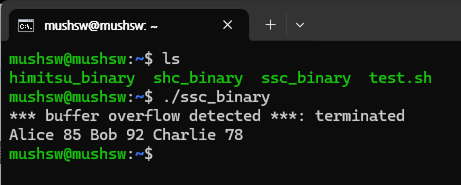
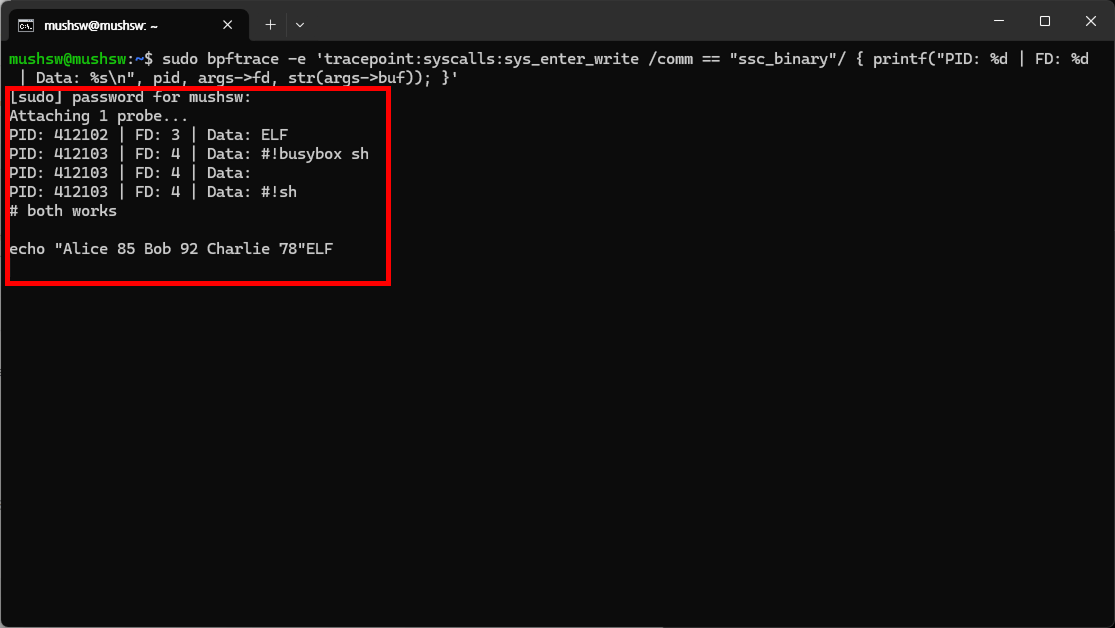
<p><strong>As shown in the red box in the image below, bpftrace (a kernel tracing tool) makes it easy to capture the shell script.</strong></p>

<p><img src="/assets/images/ssc-security-analysis/3.png" alt="Terminal 2 monitoring result" /></p>

<p><img src="/assets/images/ssc-security-analysis/4.png" alt="Terminal 1 monitoring result" /></p>

<h2 id="solution">Solution</h2>
<p>What’s needed is a protection tool that keeps the shell interpreter entirely internal instead of exposing it externally.<br />
A representative example is <a href="https://github.com/HimitsuShell/HimitsuShell">HimitsuShell</a>.</p>

<p>The next post will introduce HimitsuShell.</p>]]></content><author><name>HimitsuShell</name></author><category term="en" /><summary type="html"><![CDATA[ssc is a project that improves on shc (shell script compiler). Like shc, it wraps a shell script in C source code and compiles it into a binary to keep the code from being exposed.]]></summary></entry><entry xml:lang="ja"><title type="html">Linuxシェルスクリプトのセキュリティ: sscの構造的限界と脆弱性(ソースコード保護、難読化、リバースエンジニアリング)</title><link href="https://himitsushell.github.io/ja/ssc-security-analysis/" rel="alternate" type="text/html" title="Linuxシェルスクリプトのセキュリティ: sscの構造的限界と脆弱性(ソースコード保護、難読化、リバースエンジニアリング)" /><published>2026-08-10T00:00:00+09:00</published><updated>2026-08-10T00:00:00+09:00</updated><id>https://himitsushell.github.io/ja/ssc-security-analysis</id><content type="html" xml:base="https://himitsushell.github.io/ja/ssc-security-analysis/"><![CDATA[<p><a href="https://github.com/liberize/ssc">ssc</a>は、shc(シェルスクリプトコンパイラ)を改良したプロジェクトである。<br />
shcと同じ原理で、シェルスクリプトをCのソースコードでラップした後にバイナリへ変換し、コードの露出を防ぐ。</p>

<p>sscはshcとは異なり、システムシェルに依存せず、独自のシェルインタプリタ(例: BusyBox)を使用する。<br />
そのため、<a href="https://himitsushell.github.io/ja/shc-security-analysis/">shcを攻撃する際に使用した手法(auditd)</a>は、sscには通用しない。</p>

<p>しかし、sscもまた構造的な限界を抱えている。<br />
sscによって生成されたバイナリは、内蔵されたシェルインタプリタ(例: BusyBox)を一時的に/tmp/ssc.XXXXXX/busyboxのパスに展開し、それにシェルスクリプトを渡して実行する。<br />
<strong>したがって、内蔵されたシェルインタプリタが外部に露出する瞬間だけを監視すれば、シェルスクリプトを窃取することができる。</strong></p>

<p><img src="/assets/images/ssc-security-analysis/1.png" alt="sscの脆弱性の構造図" /></p>

<p>それでは実際にテストして脆弱性を確認してみよう。</p>

<h2 id="テスト環境">テスト環境</h2>
<p>Ubuntu 24.04で、以下のシェルスクリプトを使用する。</p>

<p><img src="/assets/images/ssc-security-analysis/2.png" alt="テスト用シェルスクリプト" /></p>

<p>以下のように<a href="https://github.com/liberize/ssc/tree/master/examples/4_embed_interpreter">シェルインタプリタ(BusyBox)を内蔵</a>した状態でテストを進める。</p>

<div class="language-shell highlighter-rouge"><div class="highlight"><pre class="highlight"><code>./ssc <span class="nb">test </span>ssc_binary <span class="nt">-s</span> <span class="nt">-r</span> <span class="nt">-e</span> busybox <span class="nt">-c</span>
</code></pre></div></div>

<h2 id="テスト方法">テスト方法</h2>
<div class="language-shell highlighter-rouge"><div class="highlight"><pre class="highlight"><code><span class="c"># Install bpftrace</span>
<span class="nb">sudo </span>apt <span class="nb">install </span>bpftrace

<span class="c"># Start monitoring in terminal 1</span>
<span class="nb">sudo </span>bpftrace <span class="nt">-e</span> <span class="s1">'tracepoint:syscalls:sys_enter_write /comm == "ssc_binary"/ { printf("PID: %d | FD: %d | Data: %s\n", pid, args-&gt;fd, str(args-&gt;buf)); }'</span>

<span class="c"># Run ssc_binary in terminal 2</span>
./ssc_binary
</code></pre></div></div>

<p><strong>以下のスクリーンショットの赤枠のように、bpftrace(カーネル監視ツール)を使用すれば、容易にシェルスクリプトを窃取することができる。</strong></p>

<p><img src="/assets/images/ssc-security-analysis/3.png" alt="ターミナル2の監視結果" /></p>

<p><img src="/assets/images/ssc-security-analysis/4.png" alt="ターミナル1の監視結果" /></p>

<h2 id="解決方法">解決方法</h2>
<p>シェルインタプリタを外部に展開せず、内部でのみ処理する保護ツールを使用しなければならない。<br />
代表的な例として<a href="https://github.com/HimitsuShell/HimitsuShell">HimitsuShell</a>がある。</p>

<p>次回の記事でHimitsuShellを紹介する。</p>]]></content><author><name>HimitsuShell</name></author><category term="ja" /><summary type="html"><![CDATA[sscは、shc(シェルスクリプトコンパイラ)を改良したプロジェクトである。 shcと同じ原理で、シェルスクリプトをCのソースコードでラップした後にバイナリへ変換し、コードの露出を防ぐ。]]></summary></entry><entry xml:lang="ko"><title type="html">리눅스 쉘 스크립트 보안: ssc의 구조적 한계와 취약점 (소스코드 보호, 난독화, 역공학)</title><link href="https://himitsushell.github.io/ko/ssc-security-analysis/" rel="alternate" type="text/html" title="리눅스 쉘 스크립트 보안: ssc의 구조적 한계와 취약점 (소스코드 보호, 난독화, 역공학)" /><published>2026-08-10T00:00:00+09:00</published><updated>2026-08-10T00:00:00+09:00</updated><id>https://himitsushell.github.io/ko/ssc-security-analysis</id><content type="html" xml:base="https://himitsushell.github.io/ko/ssc-security-analysis/"><![CDATA[<p><a href="https://github.com/liberize/ssc">ssc</a>는 shc(쉘 스크립트 컴파일러)를 개선한 프로젝트다.<br />
shc와 같은 원리로, 쉘 스크립트를 C 소스코드로 감싼 뒤 바이너리로 변환하여 코드 노출을 막는다.</p>

<p>ssc는 shc와 달리 시스템 쉘에 의존하지 않고, 별도의 쉘 인터프리터(예: BusyBox)를 사용한다.<br />
따라서 <a href="https://himitsushell.github.io/ko/shc-security-analysis/">shc를 공격할때 사용했던 기법(auditd)</a>은 ssc에서는 동일하게 사용할 수 없다.</p>

<p>그러나 ssc 역시 구조적인 한계를 가지고 있다.<br />
ssc로 생성된 바이너리는 내장된 쉘 인터프리터(예: BusyBox)를 잠시 /tmp/ssc.XXXXXX/busybox 경로에 내보내고, 이곳에 쉘 스크립트를 전달하여 실행한다.<br />
<strong>따라서 내장된 쉘 인터프리터가 외부로 노출되는 순간만 모니터링하면, 쉘 스크립트를 탈취 할 수 있다.</strong></p>

<p><img src="/assets/images/ssc-security-analysis/1.png" alt="ssc 취약점 구조도" /></p>

<p>이제 직접 테스트해서 취약점을 확인해보자</p>

<h2 id="테스트-환경">테스트 환경</h2>
<p>ubuntu 24.04에서 아래 쉘 스크립트를 사용한다.</p>

<p><img src="/assets/images/ssc-security-analysis/2.png" alt="테스트용 쉘 스크립트" /></p>

<p>아래와 같이 <a href="https://github.com/liberize/ssc/tree/master/examples/4_embed_interpreter">쉘 인터프리터(BusyBox)를 내장</a>해서 진행한다.</p>

<div class="language-shell highlighter-rouge"><div class="highlight"><pre class="highlight"><code>./ssc <span class="nb">test </span>ssc_binary <span class="nt">-s</span> <span class="nt">-r</span> <span class="nt">-e</span> busybox <span class="nt">-c</span>
</code></pre></div></div>

<h2 id="테스트-방법">테스트 방법</h2>
<div class="language-shell highlighter-rouge"><div class="highlight"><pre class="highlight"><code><span class="c"># Install bpftrace</span>
<span class="nb">sudo </span>apt <span class="nb">install </span>bpftrace

<span class="c"># Start monitoring in terminal 1</span>
<span class="nb">sudo </span>bpftrace <span class="nt">-e</span> <span class="s1">'tracepoint:syscalls:sys_enter_write /comm == "ssc_binary"/ { printf("PID: %d | FD: %d | Data: %s\n", pid, args-&gt;fd, str(args-&gt;buf)); }'</span>

<span class="c"># Run ssc_binary in terminal 2</span>
./ssc_binary
</code></pre></div></div>

<p><strong>아래 사진의 빨간 박스와 같이, bpftrace(커널 감시 도구)를 사용하면 손쉽게 쉘 스크립트를 탈취 할 수 있다.</strong></p>

<p><img src="/assets/images/ssc-security-analysis/3.png" alt="터미널2 모니터링 결과" /></p>

<p><img src="/assets/images/ssc-security-analysis/4.png" alt="터미널1 모니터링 결과" /></p>

<h2 id="해결-방법">해결 방법</h2>
<p>쉘 인터프리터를 외부로 추출하지 않고, 내부적으로만 처리하는 보호 도구를 사용해야한다.<br />
대표적인 예로 <a href="https://github.com/HimitsuShell/HimitsuShell">HimitsuShell</a>이 있다.</p>

<p>다음 글에서 HimitsuShell을 소개한다.</p>]]></content><author><name>HimitsuShell</name></author><category term="ko" /><summary type="html"><![CDATA[ssc는 shc(쉘 스크립트 컴파일러)를 개선한 프로젝트다. shc와 같은 원리로, 쉘 스크립트를 C 소스코드로 감싼 뒤 바이너리로 변환하여 코드 노출을 막는다.]]></summary></entry><entry xml:lang="zh"><title type="html">Linux Shell 脚本安全：ssc 的结构性局限与漏洞（源代码保护、混淆、逆向工程）</title><link href="https://himitsushell.github.io/zh/ssc-security-analysis/" rel="alternate" type="text/html" title="Linux Shell 脚本安全：ssc 的结构性局限与漏洞（源代码保护、混淆、逆向工程）" /><published>2026-08-10T00:00:00+09:00</published><updated>2026-08-10T00:00:00+09:00</updated><id>https://himitsushell.github.io/zh/ssc-security-analysis</id><content type="html" xml:base="https://himitsushell.github.io/zh/ssc-security-analysis/"><![CDATA[<p><a href="https://github.com/liberize/ssc">ssc</a> 是在 shc（Shell 脚本编译器）基础上改进而来的项目。<br />
其原理与 shc 相同，都是先将 Shell 脚本包装成 C 源代码，再编译为二进制文件，从而防止源码暴露。</p>

<p>与 shc 不同的是，ssc 不依赖系统 Shell，而是使用独立的 Shell 解释器（例如 BusyBox）。<br />
因此，<a href="https://himitsushell.github.io/zh/shc-security-analysis/">攻击 shc 时所使用的技术(auditd)</a>在 ssc 上无法同样奏效。</p>

<p>但 ssc 同样存在结构性的局限。<br />
由 ssc 生成的二进制文件，会将内置的 Shell 解释器（例如 BusyBox）临时导出到 /tmp/ssc.XXXXXX/busybox 路径下，再将 Shell 脚本传递到该路径执行。<br />
<strong>因此，只要监控内置 Shell 解释器暴露到外部的那一瞬间，就能窃取到 Shell 脚本。</strong></p>

<p><img src="/assets/images/ssc-security-analysis/1.png" alt="漏洞展开图" /></p>

<p>现在让我们直接测试一下，确认这个漏洞。</p>

<h2 id="测试环境">测试环境</h2>
<p>在 Ubuntu 24.04 环境下，使用如下 Shell 脚本。</p>

<p><img src="/assets/images/ssc-security-analysis/2.png" alt="测试用 Shell 脚本" /></p>

<p>下面我们通过<a href="https://github.com/liberize/ssc/tree/master/examples/4_embed_interpreter">内置 Shell 解释器（BusyBox）</a>的方式进行测试。</p>

<div class="language-shell highlighter-rouge"><div class="highlight"><pre class="highlight"><code>./ssc <span class="nb">test </span>ssc_binary <span class="nt">-s</span> <span class="nt">-r</span> <span class="nt">-e</span> busybox <span class="nt">-c</span>
</code></pre></div></div>

<h2 id="测试方法">测试方法</h2>
<div class="language-shell highlighter-rouge"><div class="highlight"><pre class="highlight"><code><span class="c"># Install bpftrace</span>
<span class="nb">sudo </span>apt <span class="nb">install </span>bpftrace

<span class="c"># Start monitoring in terminal 1</span>
<span class="nb">sudo </span>bpftrace <span class="nt">-e</span> <span class="s1">'tracepoint:syscalls:sys_enter_write /comm == "ssc_binary"/ { printf("PID: %d | FD: %d | Data: %s\n", pid, args-&gt;fd, str(args-&gt;buf)); }'</span>

<span class="c"># Run ssc_binary in terminal 2</span>
./ssc_binary
</code></pre></div></div>

<p><strong>如下图红框所示，使用 bpftrace（内核监控工具）即可轻松窃取 Shell 脚本。</strong></p>

<p><img src="/assets/images/ssc-security-analysis/3.png" alt="终端2" /></p>

<p><img src="/assets/images/ssc-security-analysis/4.png" alt="终端1" /></p>

<h2 id="解决方法">解决方法</h2>
<p>应当使用不将 Shell 解释器导出到外部、仅在内部进行处理的保护工具。<br />
具有代表性的例子是 <a href="https://github.com/HimitsuShell/HimitsuShell">HimitsuShell</a>。</p>

<p>下一篇文章将介绍 HimitsuShell。</p>]]></content><author><name>HimitsuShell</name></author><category term="zh" /><summary type="html"><![CDATA[ssc 是在 shc（Shell 脚本编译器）基础上改进而来的项目。 其原理与 shc 相同，都是先将 Shell 脚本包装成 C 源代码，再编译为二进制文件，从而防止源码暴露。]]></summary></entry><entry xml:lang="en"><title type="html">Shell Script Security: Structural Limitations and Vulnerabilities of shc (Encryption, Compiler, Obfuscation)</title><link href="https://himitsushell.github.io/en/shc-security-analysis/" rel="alternate" type="text/html" title="Shell Script Security: Structural Limitations and Vulnerabilities of shc (Encryption, Compiler, Obfuscation)" /><published>2026-08-09T00:00:00+09:00</published><updated>2026-08-09T00:00:00+09:00</updated><id>https://himitsushell.github.io/en/shc-security-analysis</id><content type="html" xml:base="https://himitsushell.github.io/en/shc-security-analysis/"><![CDATA[<p><a href="https://github.com/neurobin/shc">shc</a> is the most widely known shell script protection tool.<br />
It works by wrapping a shell script in C source code and compiling it into a binary, which keeps the source code from being exposed.</p>

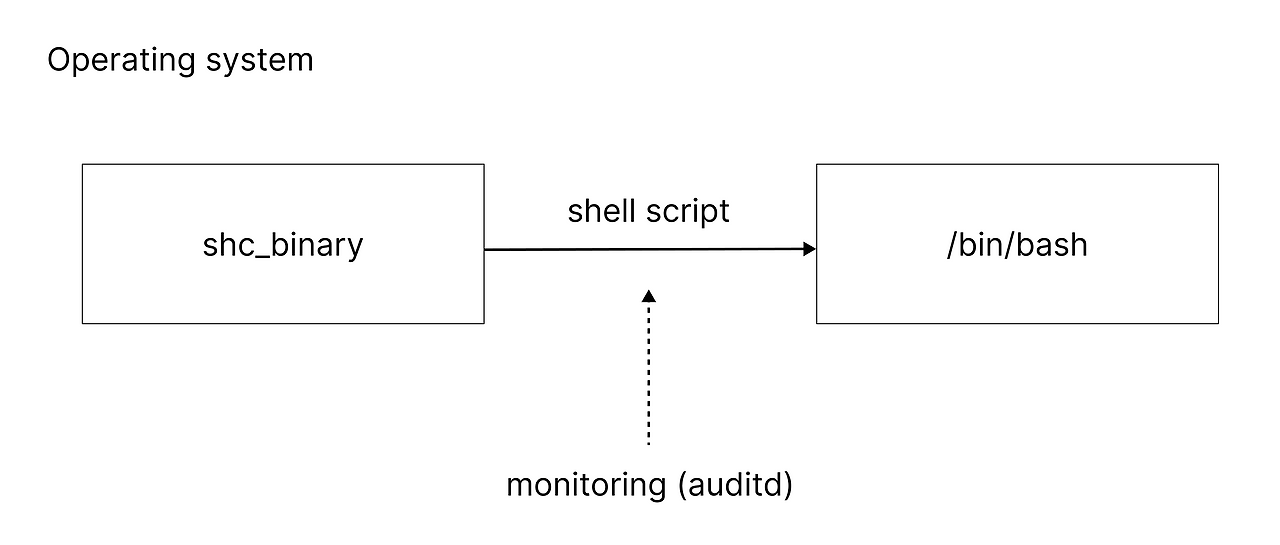
<p>However, because shc is structurally dependent on the system shell, it’s vulnerable to OS-level logging/hooking attacks.</p>

<p>A binary built with shc runs the shell script by passing it to the system shell (e.g., /bin/sh) for execution.<br />
<strong>So all you have to do is monitor the moment the arguments are passed to the system shell, and you can easily capture the shell script.</strong></p>

<p><img src="/assets/images/shc-security-analysis/1.png" alt="shc vulnerability structure diagram" /></p>

<p>Let’s actually test this and confirm the vulnerability.</p>

<h2 id="test-environment">Test Environment</h2>
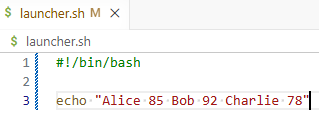
<p>The following shell script was tested on Ubuntu 24.04.</p>

<p><img src="/assets/images/shc-security-analysis/2.png" alt="Shell script used for testing" /></p>

<p>Build the binary at <a href="https://github.com/neurobin/shc/blob/master/man.md">maximum security level</a> as shown below.</p>

<div class="language-shell highlighter-rouge"><div class="highlight"><pre class="highlight"><code>shc <span class="nt">-Uf</span> launcher.sh <span class="nt">-o</span> shc_binary
</code></pre></div></div>

<h2 id="test-method">Test Method</h2>
<div class="language-shell highlighter-rouge"><div class="highlight"><pre class="highlight"><code><span class="c"># Install auditd</span>
<span class="nb">sudo </span>apt <span class="nb">install </span>auditd <span class="nt">-y</span>

<span class="c"># Register monitoring rule</span>
<span class="nb">sudo </span>auditctl <span class="nt">-a</span> <span class="nb">exit</span>,always <span class="nt">-F</span> <span class="nb">arch</span><span class="o">=</span>b64 <span class="nt">-S</span> execve

<span class="c"># Run the shc binary</span>
./shc_binary

<span class="c"># Check logs</span>
<span class="nb">sudo </span>ausearch <span class="nt">-i</span> <span class="nt">-sc</span> execve | <span class="nb">grep</span> <span class="s2">"shc_binary"</span> <span class="nt">-A</span> 100
</code></pre></div></div>

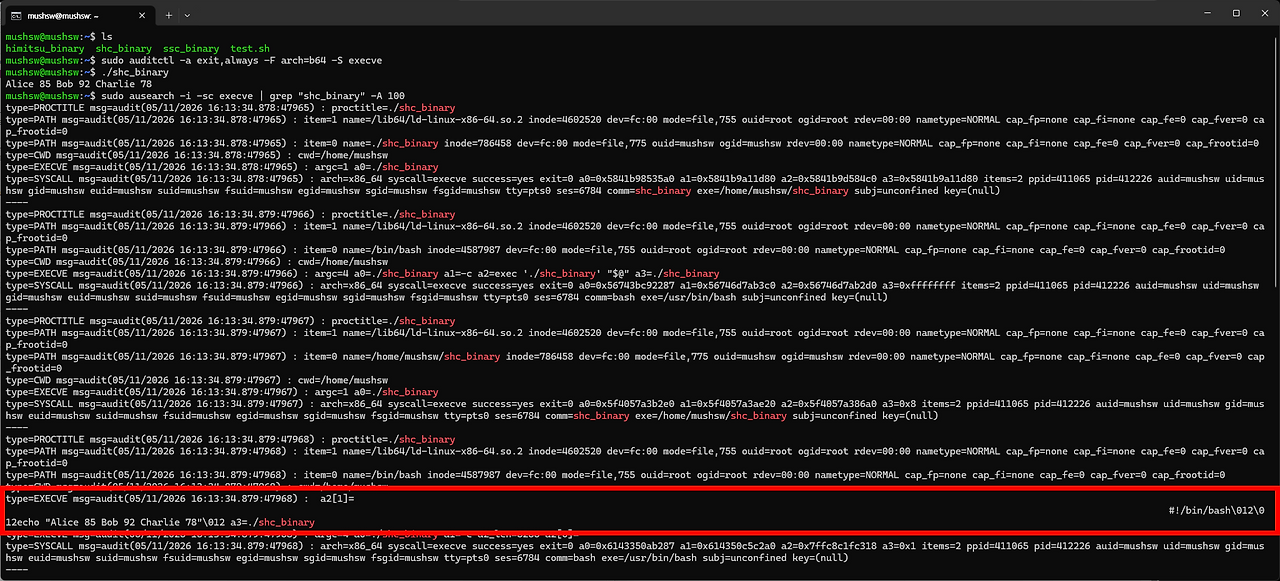
<p>As shown in the red box in the image below, <strong>using auditd (an OS-level monitoring tool) makes it trivially easy to capture the shell script</strong>.</p>

<p><img src="/assets/images/shc-security-analysis/3.png" alt="Shell script exposed in the terminal" /></p>

<h2 id="solution">Solution</h2>
<p>You need to use a protection tool that doesn’t depend on the system shell.<br />
Any tool built on a structure that relies on the system shell is fundamentally unable to defend against OS-level logging/hooking attacks like the one shown above.</p>

<p>There are protection tools out there such as <a href="https://github.com/liberize/ssc">ssc</a> and <a href="https://github.com/HimitsuShell/HimitsuShell">HimitsuShell</a>.<br />
<strong>But ssc also has a critical structural weakness.</strong></p>

<p>I’ll cover that in the next post.</p>]]></content><author><name>HimitsuShell</name></author><category term="en" /><summary type="html"><![CDATA[shc is the most widely known shell script protection tool. It works by wrapping a shell script in C source code and compiling it into a binary, which keeps the source code from being exposed.]]></summary></entry><entry xml:lang="ja"><title type="html">シェルスクリプトのセキュリティ: shcの構造的限界と脆弱性(暗号化、コンパイラ、難読化)</title><link href="https://himitsushell.github.io/ja/shc-security-analysis/" rel="alternate" type="text/html" title="シェルスクリプトのセキュリティ: shcの構造的限界と脆弱性(暗号化、コンパイラ、難読化)" /><published>2026-08-09T00:00:00+09:00</published><updated>2026-08-09T00:00:00+09:00</updated><id>https://himitsushell.github.io/ja/shc-security-analysis</id><content type="html" xml:base="https://himitsushell.github.io/ja/shc-security-analysis/"><![CDATA[<p><a href="https://github.com/neurobin/shc">shc</a>は、最も広く知られているシェルスクリプト保護ツールだ。<br />
シェルスクリプトをCソースコードでラップしてバイナリに変換する仕組みで、ソースコードの露出を防ぐ。</p>

<p>しかし、shcは構造的にシステムシェルに依存しているため、OSレベルのロギング/フッキング攻撃に弱い。</p>

<p>shcで生成されたバイナリは、シェルスクリプトをシステムシェル(例: /bin/sh)に渡して実行する。<br />
<strong>したがって、システムシェルに引数を渡す瞬間だけを監視すれば、シェルスクリプトを簡単に窃取できる。</strong></p>

<p><img src="/assets/images/shc-security-analysis/1.png" alt="shcの脆弱性構造図" /></p>

<p>では、実際にテストして脆弱性を確認してみよう。</p>

<h2 id="テスト環境">テスト環境</h2>
<p>Ubuntu 24.04で以下のシェルスクリプトを使用する。</p>

<p><img src="/assets/images/shc-security-analysis/2.png" alt="テスト用シェルスクリプト" /></p>

<p>以下のように<a href="https://github.com/neurobin/shc/blob/master/man.md">最高セキュリティレベル</a>で進める。</p>

<div class="language-shell highlighter-rouge"><div class="highlight"><pre class="highlight"><code>shc <span class="nt">-Uf</span> launcher.sh <span class="nt">-o</span> shc_binary
</code></pre></div></div>

<h2 id="テスト方法">テスト方法</h2>
<div class="language-shell highlighter-rouge"><div class="highlight"><pre class="highlight"><code><span class="c"># Install auditd</span>
<span class="nb">sudo </span>apt <span class="nb">install </span>auditd <span class="nt">-y</span>

<span class="c"># Register monitoring rule</span>
<span class="nb">sudo </span>auditctl <span class="nt">-a</span> <span class="nb">exit</span>,always <span class="nt">-F</span> <span class="nb">arch</span><span class="o">=</span>b64 <span class="nt">-S</span> execve

<span class="c"># Run the shc binary</span>
./shc_binary

<span class="c"># Check logs</span>
<span class="nb">sudo </span>ausearch <span class="nt">-i</span> <span class="nt">-sc</span> execve | <span class="nb">grep</span> <span class="s2">"shc_binary"</span> <span class="nt">-A</span> 100
</code></pre></div></div>

<p>下の画像の赤枠のように、<strong>auditd(OSレベルの監視ツール)を使えば、シェルスクリプトを簡単に窃取できる。</strong></p>

<p><img src="/assets/images/shc-security-analysis/3.png" alt="ターミナルに露出したシェルスクリプト" /></p>

<h2 id="解決方法">解決方法</h2>
<p>システムシェルに依存しない保護ツールを使用する必要がある。<br />
システムシェルに依存する構造では、上記のようなOSレベルのロギング/フッキング攻撃を理論的に防ぐことはできない。</p>

<p>他にも<a href="https://github.com/liberize/ssc">ssc</a>、<a href="https://github.com/HimitsuShell/HimitsuShell">HimitsuShell</a>などの保護ツールが存在する。<br />
<strong>しかし、sscにも致命的な構造的弱点がある。</strong></p>

<p>次の記事でこの内容を紹介する。</p>]]></content><author><name>HimitsuShell</name></author><category term="ja" /><summary type="html"><![CDATA[shcは、最も広く知られているシェルスクリプト保護ツールだ。 シェルスクリプトをCソースコードでラップしてバイナリに変換する仕組みで、ソースコードの露出を防ぐ。]]></summary></entry></feed>